

Camera-Drop 项目开坑记录

Camera-Drop 项目开坑记录

Coast23

为何开坑这个项目

这是我这学期计网的课设项目之一:编写利用可见光传输信息的软件。我感觉这个项目挺有意思的,而且也有一定的应用价值,加上项目的思路并不难,且有学长的项目(Visual-Net)以及开源方案(如libcimbarQR_Video(基于前者))可供参考,最重要的是我们是 teamwork + vibe coding,大家集思广益、齐心协力(翻译:有 AI 能用,有大腿能抱)应该能够解决项目中的各种困难。不管最后能不能做出一个合格的成品出来,中间的探索过程一定能学到不少东西的。

项目要求

  • Encoder 将文件 in.bin 编码为视频 encoded.video
  • User 拍摄屏幕上播放的 encoded.video,得到 camera.video
  • Decodercamera.video 还原为 in.bin,并输出每位有效性标记文件 vout.bin

目标成果

以下是我的期望成果(和课设项目要求不太一致):

  • 做出 EncoderDecoder,实现尽可能高的传输速率
  • % 的可靠性,保证用户正常使用时,能准确无误地传输目标文件(vout.bin 可以省了)。
  • 具备实时性,发送端将文件编码为动图并显示,接收端打开摄像头即可接收,无需经历“拷回”过程。

项目思路

若从计网的角度看待这个项目,每帧图片就是一个数据包,我们所要实现的就是设计一个合理的光学信道,实现数据包信息的单向传输。故项目的核心其实就两部分内容:

  • 设计单向传输的数据流
  • 图像编解码 & 图像处理

接下来,我就针对这两个课题,聊聊我们的实现思路。

1. 数据流设计

先看看我们的信道条件:

  • 相机拍摄屏幕会产生摩尔纹
  • 拍摄过程可能有失焦模糊
  • 相机拍摄可能偏色
  • 相机拍摄存在曝光底噪
  • 拍摄时屏幕光照不均
  • 无法保证拍摄角度完美;
  • 视频必有重复帧、可能有漏帧

显然,在如此恶劣的信道环境下,误码率肯定不容小觑,直接传输 in.bin 的 raw data 是不合理的。必须设计相应的校验与 前向纠错(FEC) 方案。

如果采用非常简单的图像编码设计(比如学长的项目),就能把误码率压下去,从而大胆扔掉冗余设计。但这也意味着单帧图像的信息密度低,传输效率会受到限制。

考虑到误码有更大的可能是因一整块区域“没拍好”所导致的,而非随机的错误,故在众多的 FEC 方案中,我决定使用 Reed-Solomon 编码(QR Code 和 Bar Code 也用了它,相信前人的选择)。这方面有现成的库libcorrect 能用,不需要去手搓算法。ECC 比例根据后续实际测试得到的信道条件来调整即可。

视频的漏帧就是“丢包”,为了应对这种情况,可以使用 Fountain Codes 这种无码率编码方案。Fountain Codes 编码后可以无限发包,接收方只要接收到一定比例的包,即可解出原数据。我们也只要根据实际的“丢包率”调整冗余比例即可。这个也不需要我们手搓,有现成的库 wirehair 能用。

数据包头部加上元信息,指示一些必要的信息。尾部加上 CRC32 校验码,用来检测包是否损坏。损坏的包直接丢弃即可。

如果把校验放到 RS 块里,就能定位出错误块的位置,这样就只需丢这一块,而不必丢掉整个包。这样做看似丢的东西减少了,但我们的传输模型需要改变(图片不再是个包,而是若干包),会增加冗余比例且实现并不容易,故丢掉整个包应是更好的选择。

此外,in.bin 在编码前,先用 zstd 压一下大小。至于文件名,放进 zstd 的 Skippable Frames 里一起传输即可。

总的编码流程:

%%{ init: { 'flowchart': { 'curve': 'basis' } } }%%
flowchart TD
    %% 分别定义4个不同颜色的半透明背景与描边
    %% 颜色顺序:翠绿 -> 青色 -> 蓝色 -> 深蓝
    classDef step1 fill:#10b98126,stroke:#10b981,stroke-width:2px,rx:10px,ry:10px;
    classDef step2 fill:#06b6d426,stroke:#06b6d4,stroke-width:2px,rx:10px,ry:10px;
    classDef step3 fill:#3b82f626,stroke:#3b82f6,stroke-width:2px,rx:10px,ry:10px;
    classDef step4 fill:#4f46e526,stroke:#4f46e5,stroke-width:2px,rx:10px,ry:10px;
    
    %% 第三个节点使用 
强制居中换行,防止溢出 A[Compress with zstd]:::step1 --> B[Chunk slicing
by image volume]:::step2 B --> C[Reed-Solomon Codes]:::step3 C --> D[Fountain Codes]:::step4 %% 连线使用天蓝色 linkStyle default stroke:#0ea5e9,stroke-width:2px;

解码就是反过来,不赘述。

2. 图像编解码

最无脑的方式就是直接用 QR Code,这方法简单且稳定。

缺点也很明显,信息密度太低(而且还被老师 ban 了)

我们当然想追求传输更高效的办法。

若像学长的项目一样,只用黑白表示像素点,虽然简单且稳定,但浪费了太多颜色空间

为了追求更高效的传输,考虑搞一套“彩色二维码”。但要如何最大程度地保证传输后的“彩色马赛克”可被正确识别?

似乎很困难。

所以转换思考方向。单个像素点不易被识别,但有图案的像素就很容易了。

于是考虑用带颜色的图案单元来编码,并设计相应的解码方案。

设选用的颜色集合的大小为,图案集合的大小为,图案单元的大小是像素,图像的大小为像素,则:

  • 共有种颜色、图案组合,能标识bits 的信息。
  • 信息密度为bits / () pixels。

先确定一个图案单元的大小,然后通过测试调整,找出保证识别成功率下的最大

由于的图案(不考虑颜色)可用一个 uint64_t 类型的数表示,非常方便,所以先取作为图案单元的大小吧。

接下来的讨论,我们都将图案视为位无符号整数。

对于待识别图案,如何确定它是里的哪个图案单元?当然是找和“最像” 的

如何衡量“相像”程度?那就看它们二进制下不同位的个数,越少说明越相像。

“二进制下不同位的个数” 即信息论中的汉明距离(Hamming Distance)。

反过来思考,为了能区分出是哪个图案,里的图案单元肯定不能太相像。Hamming Distance 相差越大应该是越好的。

所以对于给定的,取使得最大的。这就是我选择的构造的理论基础之一。

实际上,这样构造的不是最优的,因为各个位的 flips 并不是完全随机的,摄像头或者手机的图像处理,有更大的可能导致成块的 flips。但这个太玄学了,无法靠建模来分析,只能靠实验来筛选

然后,因为我认为零散的点不容易辨别,决定让这些点组成的块,作为最小像素单元。

这个判断只是我的臆断,没有经过任何实验验证。或许“马赛克”真的能提供更大的分辨率呢?

于是,要筛的图案大小就从缩小为

接下来再以最大化为目标,构造

我写了一个的贪心构造算法:

pattern_generator.cpp
/*
生成最小 Hamming Distance 尽量大的图案集。
生成的图案集需经过实验验证方能用于实际使用。
*/

#include <cstdio>
#include <vector>
#include <string>
#include <cstdint>
#include <iostream>

const int INF = 1145141919;
const int NUM = 32; // 图案数

int main(){
// 把 4x4 的 mask 拓展为 8x8 的 mask
auto expand = [&](uint16_t mask) -> uint64_t {
uint64_t res = 0;
for(int r = 0; r < 4; ++r){
for(int c = 0; c < 4; ++c){
if((mask >> (r * 4 + c)) & 1){
uint32_t r8 = r << 1;
uint32_t c8 = c << 1;
res |= (1ULL << (r8 * 8 + c8)); // 左上
res |= (1ULL << (r8 * 8 + c8 + 1)); // 右上
res |= (1ULL << ((r8 + 1) * 8 + c8)); // 左下
res |= (1ULL << ((r8 + 1) * 8 + c8 + 1)); // 右下
}
}
}
return res;
};

auto popcnt = [&](uint64_t x) -> int {
return __builtin_popcountll(x);
};

// 获取图案集的最小 Hamming Distance
auto get_dist = [&](std::vector<uint16_t>& pick) -> int {
int res = INF;
int n = pick.size();
for(int i = 0; i < n; ++i){
for(int j = i + 1; j < n; ++j){
res = std::min(res, popcnt(pick[i] ^ pick[j]));
}
}
return res;
};

// 打印 patterns, col 为每行的图案数
auto show_patterns = [&](std::vector<uint64_t>& Dict, int col = 4) -> void {
int n = Dict.size();
int row = (n + col - 1) / col;
int R = 9 * row + 1;
int C = 17 * col + 1;
std::vector<std::string> canva(R, std::string(C, ' '));
for(int i = 0; i < n; ++i){
int rx = i / col;
int cx = i % col;
int x = rx * 9, y = cx * 17; // (x, y) 是左上角 * 的画布坐标
// 绘制边框
canva[x][y] = '*';
canva[x][y + 17] = '*';
canva[x + 9][y] = '*';
canva[x + 9][y + 17] = '*';
for(int c = y + 1; c <= y + 16; ++c) canva[x][c] = '-', canva[x + 9][c] = '-';
for(int r = x + 1; r <= x + 8; ++r) canva[r][y] = '|', canva[r][y + 17] = '|';
// 绘制 mask 对应的图案
for(int dr = 0; dr < 8; ++dr){
for(int dc = 0; dc < 8; ++dc){
if((Dict[i] >> (dr * 8 + dc)) & 1){
canva[x + dr + 1][y + (dc << 1) + 1] = '#';
canva[x + dr + 1][y + (dc << 1) + 2] = '#';
}
}
}
}
for(auto& line : canva){
for(auto& c : line){
if(c == '#') std::cout << "█"; // Fuck UTF-8 Characters
else putchar(c);
}
putchar('\n');
}
};

// 4x4 图案中,只选白色个数在 6~10 之间的图案
std::vector<uint16_t> cand;
for(int i = 0; i < (1 << 16); ++i){
int p = popcnt(i);
if(p >= 6 and p <= 10) cand.push_back(i);
}
// printf("Candidate size: %u\n", cand.size());

// 钦定第一个为黑白上下对半的图案。
std::vector<uint16_t> pick; pick.push_back(0x00FF);
std::vector<int> dist(cand.size(), INF);

for(int i = 0; i < cand.size(); ++i) dist[i] = popcnt(cand[i] ^ pick[0]);

for(int k = 1; k < NUM; ++k){
int best = -1, maxDist = -1;
for(int i = 0; i < cand.size(); ++i){
if(dist[i] > maxDist){
maxDist = dist[i];
best = i;
}
}
uint16_t picked = cand[best];
pick.push_back(picked);
for(int i = 0; i < cand.size(); ++i) dist[i] = std::min(dist[i], popcnt(cand[i] ^ picked));
}

int HammingDist = get_dist(pick) << 2; // 8x8 的 Hamming Distance 是 4x4 的 4 倍
std::vector<uint64_t> Dict;
for(auto& mask4x4 : pick) Dict.push_back(expand(mask4x4));

puts("======================================");
printf("Pattern Count: %d\n", NUM);
printf("Min Hamming Distance: %d\n", HammingDist);
printf("Error Tolerance: %d flips\n", (HammingDist - 1) >> 1);
puts("======================================");

printf("const uint64_t Dict[%u] = {\n", NUM);
for(auto& mask8x8 : Dict){
printf(" ");
printf("0x%016llXULL,\n", mask8x8);
}
printf("};\n");
show_patterns(Dict, 8);
}

测试结果:

Pattern CountMin Hamming DistanceError Tolerance
83215 flips
163215 flips
322411 flips
64209 flips

上述结果仅供参考(真的有参考价值吗),具体得看摄像头的分辨能力。

然后就是将图案编码进图像中,并测试识别效果。

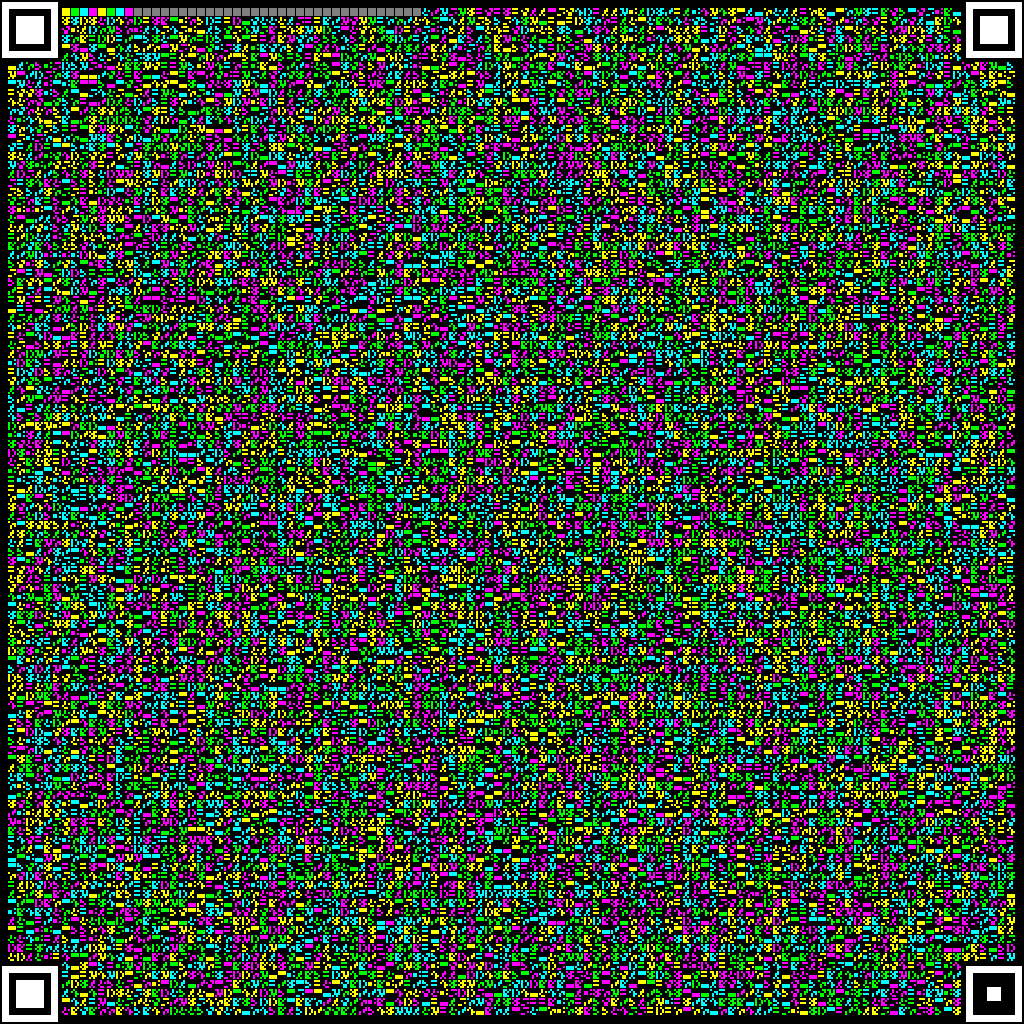
最开始,我参考了 Cimbar 的设计:图像大小设为,四周是个像素的 gap,每个图案的右边和下边留个像素的 gap,这样能放个图案单位。

图案的四个角设置的 Anchors,右下角比例为,其它个角比例为。每个 Anchor 占据的图案单位,于是编码区能放的图案数量为

编码区开头放个标准颜色块,用于颜色校准,并预设若干个 Frame Header(如果用了 Fountain Codes,则不需要)

以下是一个patterns、colors 的示例(除了图案单元外,和 Cimbar 一模一样):

encoded_16p4c.png

然后对生成的图像做一些模糊处理,看看还能不能被识别。

测试代码如下:

config_acc_test.cpp
/*
在 pattern_generator.cpp 的基础上,测试不同配置(图案集大小、颜色数)的抗干扰能力
*/

#include <cstdio>
#include <vector>
#include <random>
#include <string>
#include <cstdint>
#include <cassert>
#include <iostream>
#include <opencv2/opencv.hpp>

// 固定参数
const int GRID_SIZE = 112;
const int STRIDE = 9;
const int MARGIN = 8;
const int IMG_SIZE = 1024;
const int INF = 1145141919;

const int ANCHOR_OUT_START = 2;
const int ANCHOR_OUT_SIZE = 56;
const int ANCHOR_MID_START = 7;
const int ANCHOR_MID_SIZE = 42;
const int ANCHOR_IN_START_NORMAL = 14;
const int ANCHOR_IN_SIZE_NORMAL = 28;
const int ANCHOR_IN_START_BR = 21;
const int ANCHOR_IN_SIZE_BR = 14;

// 图案数和颜色数可调,但必须是 2 的次幂,且颜色数不能超过 8
const int NUM_PATTERNS = 16; // 图案数
const int NUM_COLORS = 4; // 颜色数

// 信道模拟开关
const bool STIMULATE_MOIRE = true; // 摩尔纹
const bool STIMULATE_BLUR = true; // 失焦模糊
const bool STIMULATE_COLOR_CAST = true; // 相机偏色
const bool STIMULATE_NOISE = true; // 高斯白噪声

std::vector<uint64_t> gen_dict(){
// 把 4x4 的 mask 拓展为 8x8 的 mask
auto expand = [&](uint16_t mask) -> uint64_t {
uint64_t res = 0;
for(int r = 0; r < 4; ++r){
for(int c = 0; c < 4; ++c){
if((mask >> (r * 4 + c)) & 1){
uint32_t r8 = r << 1;
uint32_t c8 = c << 1;
res |= (1ULL << (r8 * 8 + c8)); // 左上
res |= (1ULL << (r8 * 8 + c8 + 1)); // 右上
res |= (1ULL << ((r8 + 1) * 8 + c8)); // 左下
res |= (1ULL << ((r8 + 1) * 8 + c8 + 1)); // 右下
}
}
}
return res;
};

auto popcnt = [&](uint64_t x) -> int {
return __builtin_popcountll(x);
};

// 获取图案集的最小 Hamming Distance
auto get_dist = [&](std::vector<uint16_t>& pick) -> int {
int res = INF;
int n = pick.size();
for(int i = 0; i < n; ++i){
for(int j = i + 1; j < n; ++j){
res = std::min(res, popcnt(pick[i] ^ pick[j]));
}
}
return res;
};

// 4x4 图案中,只选白色个数在 6~10 之间的图案
std::vector<uint16_t> cand;
for(int i = 0; i < (1 << 16); ++i){
int p = popcnt(i);
if(p >= 6 and p <= 10) cand.push_back(i);
}

// 钦定第一个为黑白上下对半的图案。
std::vector<uint16_t> pick; pick.push_back(0x00FF);
std::vector<int> dist(cand.size(), INF);

for(int i = 0; i < cand.size(); ++i) dist[i] = popcnt(cand[i] ^ pick[0]);

for(int k = 1; k < NUM_PATTERNS; ++k){
int best = -1, maxDist = -1;
for(int i = 0; i < cand.size(); ++i){
if(dist[i] > maxDist){
maxDist = dist[i];
best = i;
}
}
uint16_t picked = cand[best];
pick.push_back(picked);
for(int i = 0; i < cand.size(); ++i) dist[i] = std::min(dist[i], popcnt(cand[i] ^ picked));
}

std::vector<uint64_t> Dict;
for(auto& mask4x4 : pick) Dict.push_back(expand(mask4x4));
return Dict;
}

int main(){
// 必须是 2 的次幂
assert((NUM_PATTERNS & (NUM_PATTERNS - 1)) == 0);
assert((NUM_COLORS & (NUM_COLORS - 1)) == 0);

using namespace cv;
constexpr int P_BITS = std::__lg(NUM_PATTERNS);
constexpr int C_BITS = std::__lg(NUM_COLORS);

auto get_color = [&](int color_idx) -> Vec3b {
switch(color_idx){
case 0: return Vec3b(0, 255, 255); // Yellow (R+G)
case 1: return Vec3b(0, 255, 0); // Green (G)
case 2: return Vec3b(255, 255, 0); // Cyan (G+B)
case 3: return Vec3b(255, 0, 255); // Magenta(R+B)
case 4: return Vec3b(0, 0, 255); // Red (R)
case 5: return Vec3b(255, 0, 0); // Blue (B)
case 6: return Vec3b(255, 255, 255); // White
case 7: return Vec3b(0, 128, 255); // Black 的代替
default: return Vec3b(255, 255, 255);
}
};

auto match_color = [&](Vec3b pixel) -> int {
int best = -1, min_d = INF;
for(int i = 0; i < NUM_COLORS; ++i){
Vec3b ref = get_color(i);
int db = pixel[0] - ref[0];
int dg = pixel[1] - ref[1];
int dr = pixel[2] - ref[2];
int d = db * db + dg * dg + dr * dr;
if(d < min_d){
min_d = d;
best = i;
}
}
return best;
};

auto Dict = gen_dict();

auto match_pattern = [&Dict](uint64_t mask) -> int {
int best = 0, min_d = 65;
for(int i = 0; i < Dict.size(); ++i){
int dist = __builtin_popcountll(mask ^ Dict[i]);
if(dist < min_d){
min_d = dist;
best = i;
}
}
return best;
};

// 布局映射器:判断是否是非编码区
auto is_reserved = [&](int r, int c) -> bool {
// 四个角的 7x7 定位块
if(r < 6 and c < 6) return true; // TL
if(r < 6 and c > 105) return true; // TR
if(r > 105 and c < 6) return true; // BL
if(r > 105 and c > 105) return true; // BR
// 颜色校准块
if(r == 0 and c >= 6 and c < 14) return true;
// 帧头预留区
if(r == 0 and c >= 14 and c < 46) return true;
return false; // 可用数据块
};

auto draw_one_anchor = [&](Mat& img, const int x0, const int y0, const bool is_br = false) -> void {
const int ANCHOR_IN_START = is_br ? ANCHOR_IN_START_BR : ANCHOR_IN_START_NORMAL;
const int ANCHOR_IN_SIZE = is_br ? ANCHOR_IN_SIZE_BR : ANCHOR_IN_SIZE_NORMAL;
rectangle(img, Rect(x0, y0, ANCHOR_OUT_SIZE, ANCHOR_OUT_SIZE), Scalar(255, 255, 255), FILLED);
rectangle(img, Rect(x0 + ANCHOR_MID_START, y0 + ANCHOR_MID_START, ANCHOR_MID_SIZE, ANCHOR_MID_SIZE), Scalar(0, 0, 0), FILLED);
rectangle(img, Rect(x0 + ANCHOR_IN_START, y0 + ANCHOR_IN_START, ANCHOR_IN_SIZE, ANCHOR_IN_SIZE), Scalar(255, 255, 255), FILLED);
};

auto draw_anchors = [&](Mat& img) -> void {
constexpr int tl_x = ANCHOR_OUT_START;
constexpr int tl_y = ANCHOR_OUT_START;

constexpr int tr_x = IMG_SIZE - ANCHOR_OUT_START - ANCHOR_OUT_SIZE;
constexpr int tr_y = ANCHOR_OUT_START;

constexpr int bl_x = ANCHOR_OUT_START;
constexpr int bl_y = IMG_SIZE - ANCHOR_OUT_START - ANCHOR_OUT_SIZE;

constexpr int br_x = IMG_SIZE - ANCHOR_OUT_START - ANCHOR_OUT_SIZE;
constexpr int br_y = IMG_SIZE - ANCHOR_OUT_START - ANCHOR_OUT_SIZE;

draw_one_anchor(img, tl_x, tl_y);
draw_one_anchor(img, tr_x, tr_y);
draw_one_anchor(img, bl_x, bl_y);
draw_one_anchor(img, br_x, br_y, true);
};

Mat encoder_img(IMG_SIZE, IMG_SIZE, CV_8UC3, Scalar(0, 0, 0));

std::vector<uint8_t> raw_data(GRID_SIZE * GRID_SIZE + 1);
std::mt19937 rng(114514);
std::uniform_int_distribution<int> dist_data(0, NUM_PATTERNS * NUM_COLORS - 1);

// ===========================
// 绘制布局宏观元素
// ===========================
draw_anchors(encoder_img);

// 标准颜色块
for(int i = 0; i < 8; ++i){
int startX = MARGIN + (6 + i) * STRIDE;
int startY = MARGIN + 0 * STRIDE;
rectangle(encoder_img, Rect(startX, startY, 8, 8), get_color(i % NUM_COLORS), FILLED);
}
// Frame Header 预留
for(int i = 14; i < 46; ++i){
rectangle(encoder_img, Rect(MARGIN + i * STRIDE, MARGIN, 8, 8), Scalar(128, 128, 128), FILLED);
}

// ===========================
// 编码实际数据
// ===========================

int valid_data_tiles = 0;
for(int r = 0; r < GRID_SIZE; ++r){
for(int c = 0; c < GRID_SIZE; ++c){
if(is_reserved(r, c)) continue;
++valid_data_tiles;

uint8_t data = dist_data(rng);
// raw_data.push_back(data);
raw_data[r * GRID_SIZE + c] = data;

// 高 C_BITS 位为颜色,低 P_BITS 位为图案
int pattern_idx = data & (NUM_PATTERNS - 1);
int color_idx = data >> P_BITS;

Vec3b draw_color = get_color(color_idx);
uint64_t mask = Dict[pattern_idx];

int startX = MARGIN + c * STRIDE;
int startY = MARGIN + r * STRIDE;

for(int pr = 0; pr < 8; ++pr){
for(int pc = 0; pc < 8; ++pc){
if((mask >> (pr * 8 + pc)) & 1){
encoder_img.at<Vec3b>(startY + pr, startX + pc) = draw_color;
}
}
}
}
}

std::string enc_file = format("encoded_%dp%dc.png", NUM_PATTERNS, NUM_COLORS);
imwrite(enc_file, encoder_img);

// ===========================
// 模拟恶劣信道
// ===========================

Mat camera_img = encoder_img.clone();

// 模拟摩尔纹
auto stimulate_moire = [](Mat& camera_img) -> void {
for(int r = 0; r < IMG_SIZE; ++r) {
for(int c = 0; c < IMG_SIZE; ++c) {
float moire = 0.85f + 0.20f * sin(r * 0.45f + c * 0.35f);
Vec3b& px = camera_img.at<Vec3b>(r, c);
px[0] = saturate_cast<uchar>(px[0] * moire);
px[1] = saturate_cast<uchar>(px[1] * moire);
px[2] = saturate_cast<uchar>(px[2] * moire);
}
}
};

// 模拟失焦模糊
auto stimulate_blur = [](Mat& camera_img) -> void {
GaussianBlur(camera_img, camera_img, Size(5, 5), 1.2);
};

// 模拟相机偏色和曝光底噪
auto stimulate_color_cast = [](Mat& camera_img) -> void {
for(int r = 0; r < IMG_SIZE; ++r) {
for(int c = 0; c < IMG_SIZE; ++c) {
Vec3b& px = camera_img.at<Vec3b>(r, c);
px[0] = saturate_cast<uchar>(px[0] * 0.8 + 50); // Blue 衰减
px[1] = saturate_cast<uchar>(px[1] * 0.9 + 50); // Green 衰减
px[2] = saturate_cast<uchar>(px[2] * 1.1 + 40); // Red 增强
}
}
};

// 高斯白噪声
auto stimulate_noise = [](Mat& camera_img) -> void {
Mat noise(IMG_SIZE, IMG_SIZE, CV_8UC3);
randn(noise, Scalar(0,0,0), Scalar(15,15,15));
add(camera_img, noise, camera_img);
};

if(STIMULATE_MOIRE) stimulate_moire(camera_img);
if(STIMULATE_BLUR) stimulate_blur(camera_img);
if(STIMULATE_COLOR_CAST) stimulate_color_cast(camera_img);
if(STIMULATE_NOISE) stimulate_noise(camera_img);

std::string camera_file = format("camera_%dp%dc.png", NUM_PATTERNS, NUM_COLORS);
imwrite(camera_file, camera_img);

// ===========================
// 解码与评测
// ===========================

Mat gray_img;
cvtColor(camera_img, gray_img, COLOR_BGR2GRAY);

int correct = 0;
int error_patterns = 0;
int error_colors = 0;

for(int r = 0; r < GRID_SIZE; ++r){
for(int c = 0; c < GRID_SIZE; ++c){
if(is_reserved(r, c)) continue;

int startX = MARGIN + c * STRIDE;
int startY = MARGIN + r * STRIDE;
Rect roi(startX, startY, 8, 8);

Mat cell_gray = gray_img(roi);
Mat cell_bgr = camera_img(roi);

Mat binary_cell;
threshold(cell_gray, binary_cell, 0, 255, THRESH_BINARY | THRESH_OTSU);

uint64_t tile_mask = 0;
for(int pr = 0; pr < 8; ++pr){
for(int pc = 0; pc < 8; ++pc){
if(binary_cell.at<uchar>(pr, pc) > 128){
tile_mask |= (1ULL << (pr * 8 + pc));
}
}
}
int best_pat = match_pattern(tile_mask);
int sumB = 0, sumG = 0, sumR = 0, valid_pixels = 0;
uint64_t best_mask = Dict[best_pat];
for(int pr = 0; pr < 8; ++pr){
for(int pc = 0; pc < 8; ++pc){
if((best_mask >> (pr * 8 + pc)) & 1){
Vec3b& px = cell_bgr.at<Vec3b>(pr, pc);
sumB += px[0];
sumG += px[1];
sumR += px[2];
++valid_pixels;
}
}
}
int best_color = 0;
if(valid_pixels > 0){
Vec3b avg_color = Vec3b(sumB / valid_pixels, sumG / valid_pixels, sumR / valid_pixels);
best_color = match_color(avg_color);
}

uint8_t decoded_byte = (best_color << P_BITS) | best_pat;
uint8_t expected_byte = raw_data[r * GRID_SIZE + c];

if(decoded_byte == expected_byte) ++correct;
else{
if(best_pat != (expected_byte & (NUM_PATTERNS - 1))) ++error_patterns;
if(best_color != (expected_byte >> P_BITS)) ++error_colors;
}
}
}

int payload_bytes = valid_data_tiles * (NUM_PATTERNS + NUM_COLORS) >> 3;

puts("========================================");
printf("Configuration: %d patterns, %d colors\n", NUM_PATTERNS, NUM_COLORS);
printf("Payload per Frame: %d Bytes\n", payload_bytes);
printf("Correctly Decoded: %d / %d\n", correct, valid_data_tiles);
printf("Error Patterns: %d\n", error_patterns);
printf("Error Colors: %d\n", error_colors);
printf("Accuracy: %.2f%%\n", 100.0 * correct / valid_data_tiles);
puts("========================================");
}

简单的测试,结果如下:

ConfigurationPayload per FrameCorrectly DecodedPattern ErrorsColor ErrorsAccuracy
16p 4c3090011664 / 123606663294.37%
32p 4c5562011434 / 1236082211292.51%
64p 4c10506011016 / 12360115325389.13%
16p 8c370809209 / 123601207203574.51%
32p 8c618008956 / 123601528197572.46%
64p 8c1112408120 / 123601215342465.70%

从测试结果来看,种颜色的 config 不易分辨,所以颜色数可以定为种了。

图案数暂定为(因为单个图案可以用一个 uint64_t 表示,方便),等后续解决了图像定位、识别的难题后再回头调整。

由于上面只是模拟结果,和实际可能有较大出入,所以下一步就是用实际拍摄所得的图片来测试。

接着我就花了天研究如何定位相机拍摄图像里的“二维码”。

能想到的定位思路有种:

  • 轮廓树检测法网上搜到的二维码定位算法大多是这个。
  • “扫描线法”,这是 Cimbar 的方法,但我没看懂它的代码,所以不敢采用。
  • yolov 模型检测,我没用过,所以没去尝试。
  • ArUco Marker,使用现有的 Marker 库,感觉很蠢所以先不用。

我觉得轮廓树法挺简单的,就决定用它了。

我所设计的算法流程:

%%{ init: { 'flowchart': { 'curve': 'basis' } } }%%
flowchart TD
    %% 分别定义4个不同颜色的半透明背景与描边
    %% 颜色顺序:天蓝 -> 靛蓝 -> 紫色 -> 玫红
    classDef step1 fill:#0ea5e926,stroke:#0ea5e9,stroke-width:2px,rx:10px,ry:10px;
    classDef step2 fill:#6366f126,stroke:#6366f1,stroke-width:2px,rx:10px,ry:10px;
    classDef step3 fill:#a855f726,stroke:#a855f7,stroke-width:2px,rx:10px,ry:10px;
    classDef step4 fill:#ec489926,stroke:#ec4899,stroke-width:2px,rx:10px,ry:10px;
    
    A[Image Preprocessing]:::step1 --> B[Find Contours]:::step2
    B --> C[Region Normalization]:::step3
    C --> D[Check Region Type]:::step4
    
    %% 连线使用柔和的紫色
    linkStyle default stroke:#8b5cf6,stroke-width:2px;

预处理抄 Cimbar,找轮廓抄网上的博客,区域的角度旋转、视角矫正靠 AI,最后的检查用我手搓的唐诗算法。

AI 的检查算法,效果是这样的:

hui

代码如下:

image_parser.cpp
/*
解决图像的定位与标准化问题
*/

#include <vector>
#include <string>
#include <opencv2/opencv.hpp>

using namespace cv;

const int IMG_SIZE = 1024;

const double ANCHOR_CENTER_OFFSET = 30.0;

enum AnchorType {
ANCHOR_NONE = 0,
ANCHOR_NORMAL = 1, // 1:1:4:1:1
ANCHOR_BR = 2 // 1:2:2:2:1
};

struct Anchor {
Point2d pt; // 中心点
AnchorType type; // 类型
double size; // 尺寸
int contourIdx; // 轮廓索引
};

int COUNT = 0;

float get_ratio_error(const std::vector<uchar>& a, const std::vector<uchar>& b){
if(a.size() != b.size()) return 999.0f;

float sumA = 0, sumB = 0;
for(auto& l : a) sumA += l;
for(auto& l : b) sumB += l;
if(sumA == 0 or sumB == 0) return 999.0f;

float error = 0.0f;
for(size_t i = 0; i < a.size(); ++i){
float norm_a = (float)a[i] / sumA;
float norm_b = (float)b[i] / sumB;
error += std::abs(norm_a - norm_b);
}
return error;
}

// 四个角点排序
// 我讨厌 float,但 RotatedRect::points 居然不支持 Point2d 类型,所以不得不用 float
void sort_corner(Point2f* src, Point2f* dst){
Point2f center(0, 0);
for(int i = 0; i < 4; ++i) center += src[i];
center *= 0.25;
// sum = x + y, diff = y - x;
// TL 是 sum 最小的, BR 是 sum 最大的, TR 是 diff 最小的, BL 是 diff 最大的
float min_sum = 9e5, max_sum = -9e5;
float min_diff = 9e5, max_diff = -9e5;
int TL = 0, BR = 0, TR = 0, BL = 0;
for(int i = 0; i < 4; ++i){
float s = src[i].x + src[i].y;
float d = src[i].y - src[i].x;
if(s < min_sum){min_sum = s; TL = i;}
if(s > max_sum){max_sum = s, BR = i;}
if(d < min_diff){min_diff = d; TR = i;}
if(d > max_diff){max_diff = d; BL = i;}
}

dst[0] = src[TL];
dst[1] = src[TR];
dst[2] = src[BR];
dst[3] = src[BL];
}

// 规范化 ROI
Mat get_normalized_roi(const Mat& roi, RotatedRect rRect) {
Point2f corners[4];
rRect.points(corners);
const float expansion = 1.5f; // 扩大 1.5 倍
for(int i = 0; i < 4; ++i){
corners[i] -= rRect.center;
corners[i] *= expansion;
corners[i] += rRect.center;
}

Point2f src_pts[4];
sort_corner(corners, src_pts);

const float d = 64; // 目标尺寸
Point2f dst_pts[4] = {
Point2f(0, 0),
Point2f(d, 0),
Point2f(d, d),
Point2f(0, d)
};

Mat M = getPerspectiveTransform(src_pts, dst_pts);
Mat norm;
warpPerspective(roi, norm, M, Size(d, d));

// 变换过程似乎会产生灰度,再做个二值化
threshold(norm, norm, 0, 255, THRESH_BINARY | THRESH_OTSU);
return norm;
}

AnchorType get_roi_type(const Mat& roi, const bool dir){
// dir = 0 for Horizontal, 1 for Vertical
int center = dir ? roi.cols >> 1 : roi.rows >> 1;
int length = dir ? roi.cols : roi.rows;

if(!(dir & 1)) ++COUNT;

// 白 - 黑 - 白 - 黑 -白
// 自创神秘扫描法:在区域块中心,扫宽度为 5 的条带上的像素数量
int BAND = 5;
int start = std::max(center - BAND / 2, 0);
int diff_cnt = 0;
std::vector<std::vector<std::pair<uchar, uchar>>> lens(BAND);
std::vector<uchar> last_color(BAND), count(BAND); // roi 不超过 100x100,不担心溢出

auto get_color = [&](int i, int offset) -> uchar {
int r, c;
if(dir == 0){
r = start + offset;
c = i;
}
else{
c = start + offset;
r = i;
}
if(r < 0 or r >= roi.rows or c < 0 or c >= roi.cols) return 0;
return roi.at<uchar>(r, c) > 127 ? 1 : 0;
};

for(int i = 0; i < length; ++i){

bool diff = false;
uchar color0 = get_color(i, 0);

for(int j = 0; j < BAND; ++j){

uchar color = get_color(i, j);
if(color != color0) diff = true;

if(i == 0){
last_color[j] = color;
count[j] = 1;
continue;
}
if(color == last_color[j]) ++count[j];
else{
lens[j].emplace_back(count[j], color ^ 1);
count[j] = 1;
last_color[j] = color;
}
}
if(diff) ++diff_cnt;
if((double)diff_cnt / length > 0.3){
// imwrite("./roi/roi" + std::to_string(COUNT) + ".png" , roi);
// printf("ROI %u fails in diff test.\n", COUNT);
return ANCHOR_NONE;
}
}
for(int j = 0; j < BAND; ++j) if(count[j] > 1) lens[j].emplace_back(count[j], last_color[j]);

int min_size = 114514;
for(int j = 0; j < BAND; ++j) min_size = std::min(min_size, (int)lens[j].size());
if(min_size < 5){
// imwrite("./roi/roi" + std::to_string(COUNT) + ".png" , roi);
// printf("ROI %u fails in min-size test.\n", COUNT);
return ANCHOR_NONE;
}

// BAND 段都有 白-黑-白-黑-白 且比例正确的特征
// 放松条件,80% 的 band 符合这个特征即可?
const float ERROR_THRESHOLD = 0.4f;

auto get_band_type = [&](const std::vector<std::pair<uchar, uchar>>& band) -> AnchorType {
if(band.size() < 5) return ANCHOR_NONE;

for(size_t i = 0; i <= band.size() - 5; ++i){
if(!band[i].second) continue;
std::vector<uchar> vec;
for(int j = 0; j < BAND; ++j) vec.push_back(band[i + j].first);
auto err = get_ratio_error(vec, {1, 1, 4, 1, 1});
if(err < ERROR_THRESHOLD) return ANCHOR_NORMAL;
err = get_ratio_error(vec, {1, 2, 2, 2, 1});
if(err < ERROR_THRESHOLD) return ANCHOR_BR;
}
return ANCHOR_NONE;
};

std::vector<uchar> type_count(3);
for(int i = 0; i < BAND; ++i) ++type_count[get_band_type(lens[i])];
for(int i = 1; i <= 2; ++i){
if((double)type_count[i] / BAND >= 0.6) return (AnchorType)i;
}
// imwrite("./roi/roi" + std::to_string(COUNT) + ".png" , roi);
// printf("ROI %u fails in type test: (%d, %d, %d).\n", COUNT, type_count[0], type_count[1], type_count[2]);
return ANCHOR_NONE;
}

class Scanner {

public:
static void threshold_fast(const Mat& img, Mat& out){
// reserved
threshold(img, out, 0, 255, THRESH_BINARY | THRESH_OTSU);
}

static void threshold_adaptive(const Mat& img, Mat& out){
// 自适应二值化,应对光照不均
// unsigned int unit = std::min(img.cols, img.rows);
// unit = get_block_size(unit * 0.05);
// adaptiveThreshold(img, out, 255, ADAPTIVE_THRESH_MEAN_C, THRESH_BINARY, unit, -10);
int blockSize = std::min(img.cols, img.rows) / 20;
if(blockSize % 2 == 0) ++blockSize;
adaptiveThreshold(img, out, 255, ADAPTIVE_THRESH_GAUSSIAN_C, THRESH_BINARY, blockSize, 5);
}

inline void preprocess(const Mat& img, Mat& out, const bool fast = false){
Mat tmp;
// 灰度图
if(img.channels() >= 3) cvtColor(img, tmp, COLOR_BGR2GRAY);
else tmp = img.clone();

/*
// 高斯模糊去噪点
unsigned int unit = std::min(img.cols, img.rows);
// wtf what's this param?
unit = std::max(get_block_size((unsigned)(unit * 0.002)), 3U);
GaussianBlur(tmp, tmp, Size(unit, unit), 0);
*/
// 二值化
if(fast) threshold_fast(tmp, out);
else threshold_adaptive(tmp, out);

imwrite("preprocess.png", out);
}

std::vector<Anchor> get_anchors(Mat& src){
Mat img;
preprocess(src, img);

// 查找轮廓
std::vector<std::vector<Point>> contours;
std::vector<Vec4i> hierarchy;
findContours(img, contours, hierarchy, RETR_TREE, CHAIN_APPROX_SIMPLE);
printf("coutours: %u\n", contours.size());
std::vector<Anchor> candidates;

// 筛选
for(int i = 0; i < contours.size(); ++i){
// 1. 必须有子轮廓
int child = hierarchy[i][2];
if(child == -1) continue;
// 2. 必须有孙子轮廓
// int grandChild = hierarchy[child][2];
// if(grandChild == -1) continue;

// 3. 孙子轮廓没有子轮廓
// if(hierarchy[grandChild][2] != -1) continue;

// 4. 简单的几何验证
RotatedRect rRect = minAreaRect(contours[i]);
// 太小或太大的不要
if(rRect.size.width < 50 or rRect.size.height < 50) continue;
if(rRect.size.width > 100 or rRect.size.height > 100) continue;

Mat roi = get_normalized_roi(img, rRect);

AnchorType typeX = get_roi_type(roi, 0);
AnchorType typeY = get_roi_type(roi, 1);

if(typeX == typeY and typeX != ANCHOR_NONE){
Anchor anchor;
anchor.pt = rRect.center;
anchor.type = typeX;
anchor.size = (rRect.size.width + rRect.size.height) / 2.0f;
anchor.contourIdx = i;
candidates.push_back(anchor);
}
}
deduplicate(candidates);
return candidates;
}

// 去重逻辑:合并同心圆,优先保留大的
void deduplicate(std::vector<Anchor>& cand){
std::vector<Anchor> res;
std::vector<bool> used(cand.size());
for(size_t i = 0; i < cand.size(); ++i){
if(used[i]) continue;
Anchor best = cand[i];
used[i] = true;
for(size_t j = i + 1; j < cand.size(); ++j){
if(used[j]) continue;
if(norm(cand[i].pt - cand[j].pt) < cand[i].size * 0.5){
if(cand[j].size > best.size) best = cand[j];
used[j] = true;
}
}
res.push_back(best);
}
cand.swap(res);
}

void draw_anchors(Mat& img, const std::vector<Anchor>& anchors){
std::vector<Anchor> norms, brs;
for(const auto& anchor : anchors){
if(anchor.type == ANCHOR_NORMAL) norms.push_back(anchor);
else if(anchor.type == ANCHOR_BR) brs.push_back(anchor);
}
printf("Detected Normal: %u\n", norms.size());
printf("Detected BR: %u\n", brs.size());

Mat canvas = img.clone();
for(const auto& anchor : anchors){
Scalar color = (anchor.type == ANCHOR_BR) ? Scalar(0,0,255) : Scalar(0,255,0);
circle(canvas, anchor.pt, anchor.size / 2, color, 4);
}
imwrite("anchors.png", canvas);
}

void normalize(Mat& img){
// TODO
}

private:
static inline unsigned get_block_size(unsigned v){
// 返回 >= v 的最小的 2^p + 1
--v;
v |= v >> 1;
v |= v >> 2;
v |= v >> 4;
v |= v >> 8;
v |= v >> 16;
return std::max(3U, v + 2);
}

};

int main(const int argc, const char* argv[]){
if(argc < 2) return -1;
Mat srcImg = imread(argv[1]);
Scanner scanner;
auto anchors = scanner.get_anchors(srcImg);
scanner.draw_anchors(srcImg, anchors);
return 0;
}

虽然我搓的 get_roi_type 函数能稳定区分出 Anchor 的类型,但在经过几轮测试和调试后,我发现,网上讲的 findContours(img, contours, hierarchy, RETR_TREE, CHAIN_APPROX_SIMPLE); 这个函数对 Anchor 轮廓的识别成功率不高…

那还说啥了,被网上教程坑了,白忙活了大半天。

好在走了另一条路的 xqy 佬取得了很大的成功:他所训练的 yolov 模型能非常稳定地定位 Anchor。

此外,他还编写了一套 generator 和 benchmark 代码,跑出了一套效果不错的 pattern;手搓了定位后图像的标准化代码,远比 OpenCV 的变换函数高效。

于是,图像编解码的工作就先交给他了。

3. 其它工作

虽然核心问题的解决思路有了,但还有一些细节问题需要处理。

  • 数据流编码的数据单位是bits,但图像编码的数据单位是bits,需要写一个 bitstream 转换器。
  • 视频不可避免地有重复帧,对重复帧做图像的 decode 是非常浪费计算资源的,可能要用图像哈希算法(如 ahash)来判断画面中的图像是否变化。
  • 图像的 decode 是解码的瓶颈,可能要使用并发技术来提高解码效率。
  • 为了实现 Live Decoding,我们可能会用 WASM 做一个类似Cimbar Encoder的网站,支持上传文件、编码并显示图像(用电脑),以及摄像头扫描解码(用手机),无需下载安装任何软件。
  • 各种测试和参数调整。

预期传输效率

一步一步算。

每帧有个编码区,数据包大小Bytes。

Reed-Solomon 选择经典的,则一共能装个数据块。

元信息大小为Bytes,CRC32 校验码为Bytes,则有效载荷为Bytes。

FPS 选最保守的,则能达到Mbps,即KB/s 的传输速率。

达到了大部分限速网盘的水准。

仓库地址

Camera-Drop

还在施工中。喜欢可以给个 star。

  • 标题: Camera-Drop 项目开坑记录
  • 作者: Coast23
  • 创建于 : 2026-03-05 15:03:40
  • 更新于 : 2026-03-05 20:32:03
  • 链接: https://coast23.github.io/2026/03/05/Camera-Drop-项目开坑记录/
  • 版权声明: 本文章采用 CC BY-NC-SA 4.0 进行许可。
评论